Showing posts with label Curriculum Review. Show all posts

Tuesday, November 10, 2015

The Critical Thinking Co. - Surfing the Net: Science - Review


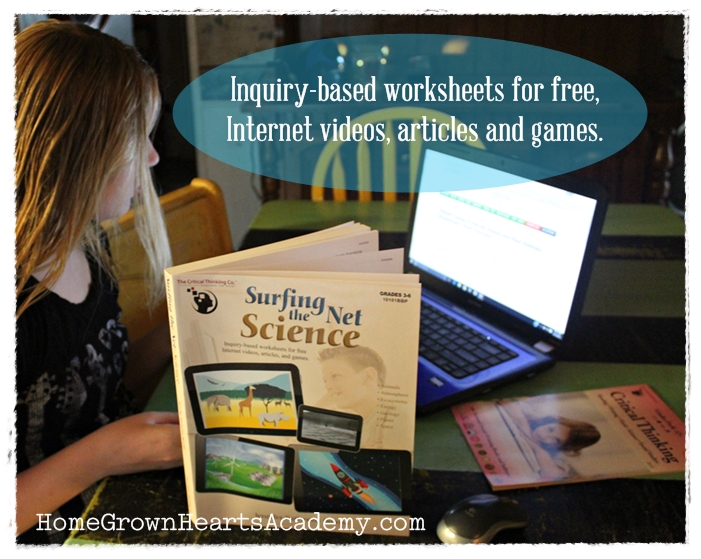
I have found out through my years of homeschooling that teaching science can sometimes be a challenge. I have searched high and low for products that will make teaching the subject easier. I finally found they perfect one. It's called Surfing the Net: Science. My daughters recently had a blast reviewing Surfing the Net: Science from The Critical Thinking Co.


Surfing the Net: Science is a paperback workbook that is recommended for grades 3-6. It helps teach about a broad range of science topics such as:
  • Animals
  • Atmosphere
  • Ecosystems and Habitats
  • Energy
  • Geology
  • Plants
  • Space
"Each science concept is taught using free, engaging, Internet-based science resources such as videos, articles, pictures, games, and diagrams and reproducible worksheets that ensure an in-depth understanding of each science concept. Surfing the Net: Science also teaches students how to research information on the Internet to help them broaden their knowledge of the web as an information resource. The inquiry-based worksheets develop critical thinking skills to broaden depth of analysis. Activities can be teacher led instruction or student-guided instruction."
-Quote from the The Critical Thinking Co.


Each topic covers critical thinking inquiries in five different capacities:
  • Defining
  • Describing
  • Analyzing and Synthesizing
  • Expanding Knowledge
  • Investigating

How my daughters used Surfing the Net: Science

My daughters choose to complete the lessons together. They are 12, 11, and 9. They worked in the book about three times per week. Each topic in the lessons included information on the topic as well as websites they could visit to learn more. They had to research to find answers to questions. I loved that the links for each activity are available all together on a Critical Thinking website so that my daughters were able to click on the links rather than type them. Although, they did choose to type in a few of them and I felt like that was helping to improve their typing skills. It was fun to watch my daughters work together to learn, research, and complete the worksheets. The information they were learning was wonderful as well as the research skills they developed. So far they have learned about amphibians, animal cells, birds, fish, insects, invertebrates and mammals. 

One of the things that my daughters said that they really enjoyed was being able to be creative with artwork of their own. They also enjoyed the fact that they were able to use the computers more than normal. I also didn't mind that they were using the computers because they were learning so much. 


Final Thought

I loved Surfing the Net: Science! My children loved it as well. They didn't finish the workbook and plan on continuing on with it until it is finished. It's refreshing that my daughters found a curriculum that they enjoy and can work on together. It has proved to be a real blessing to our family.

How much does Surfing the Net: Science cost?

Right now you can purchase the paperback book or the eBook for only $24.99


Facebook:
Google+:
Twitter:
Pinterest:

***********************************


Click below to read more reviews from the Schoolhouse Review Crew
The Critical Thinking Company Review


Crew Disclaimer

Like our blog? You can Subscribe and/or check us out on
Facebook, Twitter, Google+, and Pinterest

Enter your email address:
 
Delivered by FeedBurner

Monday, March 09, 2015

Visual Learning Systems ~ Review


Friends, in our family, we love all things science. We love watching science videos, reading science books, doing science experiments and especially reviewing science products. We were recently blessed with the opportunity to review Digital Science Online: Elementary Edition (Grades K-5) and the Secondary Edition (Grades 6-12) from Visual Learning Systems. I reviewed this with my daughters who are 11, 10, and 8 and we absolutely loved this review. 


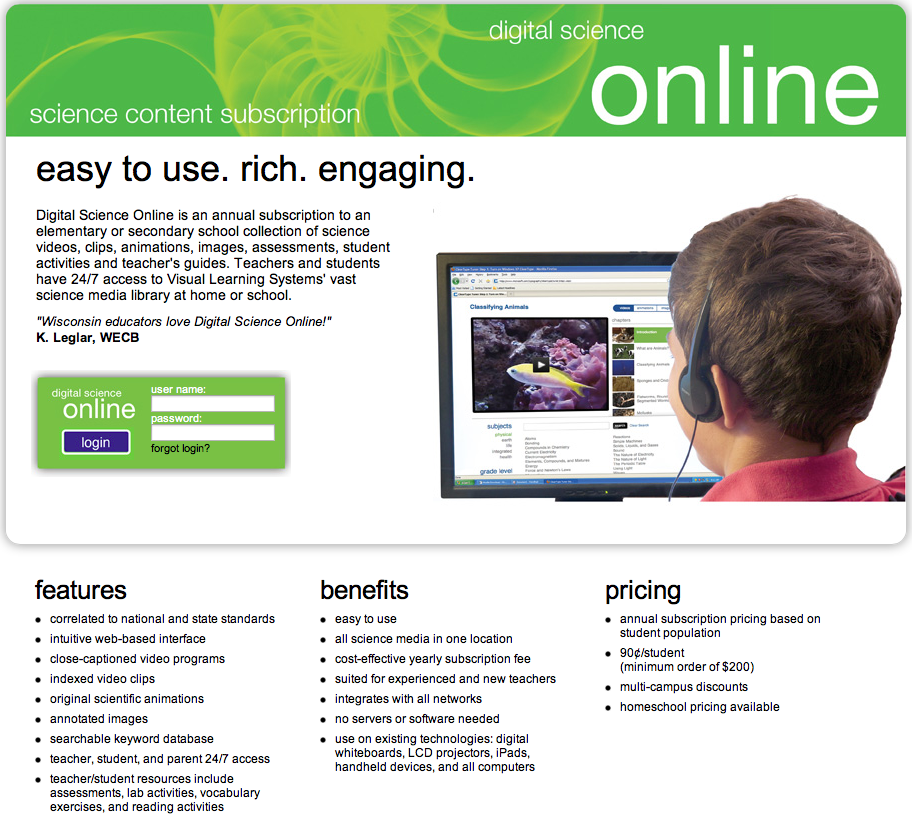
Visual Learning Systems is a great company that offers a wonderful online science program called Digital Science Online. It is full of wonderful lessons, high-quality videos, animations, student worksheets and teaching guides. Teachers and students have 24/7 access to Visual Learning Systems’ vast online science media library. 


Digital Science Online: Elementary Edition is made up of topics for the K-5 levels. There are two groups: the primary level for K-2 and the elementary level for grades 2-5. You may pick and choose which subject and topics you would like to learn about in either of the levels. For this review we also had access to the Secondary Edition, which is for grades 6-12. We didn't get around to exploring this edition as much as I would have liked, but definitely plan to do so in the near future.


We mostly used Digital Science Online: Elementary Edition  for grades 2-5. In this section there are three subjects to choose from. The subjects are Physical, Earth and Life. We loved the many different topics to choose from within each subject. 


Once we choose a topic to learn about, we were able to watch a high-quality video. The videos are broke down into chapters. I really loved this about the videos. It made watching them easier. If we needed to go back and review a portion, we didn't have to go through the whole video searching. At the end of each video there is a video assessment. This was wonderful. The assessments allowed my daughters and I to see how much we retained and learned during the course of the video.   


A favorite part for my daughters was also being able to see animations and images that are included in the videos. I have very visual children and these options truly helped my daughters learn more. My favorite part was of course the teacher guides. I loved that I had the choice to download and print out wonderful worksheets as they were needed and the option to download and print out the full guide. I always enjoyed printing out the a worksheet called video review. The video review worksheet allowed my daughters to answer questions as they watched the video. This was extremely helpful for remembering key points within the videos.

We found that Digital Science Online: Elementary Edition (Grades K-5) not only taught us visually but also allowed us to get very hands-on with each topic. For instance, when my daughters learned about landforms, I was able to download a worksheet that gave us very clear instructions on making salt dough landforms. This was so fun for my daughters. I loved that they seemed to be having so much fun learning. That's always what I aim for when teaching my daughters and Visual Learning Systems helped me achieve that. 


Through the course of the review my daughters learned about Earth's Nearest Neighbors, Earth's Rotation and Revolution, Landforms, and Minerals. We are looking forward to learning about so much more. Visual Learning Systems was a true blessing to our family. 


How much does it cost?

Visual Learning Systems offers subscription pricing for both public and homeschool families. 

If you are a public school, the pricing is 90 cents per student, with a $300 minimum order, per year. 

Homeschool pricing for the online program is $99/yr. for the elementary edition (K-5) and $99/yr for the secondary edition (6-12). This does not include any public performance rights. 


Want to connect with Visual Learning Systems?


*************************

Click below to read more reviews from the Schoolhouse Review Crew
Visual Learning Systems Review


Crew Disclaimer

Like our blog? You can Subscribe and/or check us out on Facebook, Twitter, Google+, and Pinterest

Enter your email address:
 
Delivered by FeedBurner

Friday, August 22, 2014

UberSmart Math Facts ~ Review


I have admitted before and I'll say it again. Math has not been a favorite subject in our household. So when I come across a product that works, I usually stick with it. I was anxious to review UberSmart Math Facts from UberSmart Software because I wasn't sure how it was going to be received. Should I have been anxious? Nope, not at all. It was received very well. I'm glad my daughter had the opportunity to review it. We will be sticking with this one. 


UberSmart Math Facts is a Windows based software program that teaches basic addition, subtraction, multiplication, and division facts. The program is geared for grades K-6, but can be used by anyone at any age that needs math fact reinforcement.

The program was designed by a gentleman named, David Kocur. Mr. Kocur is a homeschool dad and a computer programmer. One day, his wife asked him to design a flash card program to help their children. His initial thoughts were to just download one, but after much research he wasn't finding one he was happy with. He finally decided to create one and the results were amazing. His daughters went from hating math to loving it. Mr. Kocur was so pleased with the results he decided to share his program with everyone. I'm thankful that he did! 

Friends, learning how this program helped his daughters motivated me! I wanted to see these results in my own daughters. 

How we used UberSmart Math Facts

I downloaded UberSmart Math Facts and immediately started checking it out. I was instantly very pleased at the set-up. It wasn't overwhelming and I loved how it presented everything in a easy to use way. At the top of the program there is six choices to choose from.  You have the option to pick Learn, Practice, Test, Compete, Report, and Maintain.


{Learn}

In this option, my daughter had the opportunity to choose dot cards or to choose flash cards. The next step after picking, is to choose what skill (addition, subtraction, multiply, or division) and what number group she wanted to learn.  For instance, she could choose multiply and then choose the number 5. It would then bring up all of the multiplication facts for the number 5. In this section it was only to learn them. She wasn't asked to answer the questions but had the option to push the show button to see the correct answers.


{Practice}

In the practice section, you can choose from dot cards, keyboard entry, and flash cards. Unlike the learn section, my daughter was now able to answer the questions. When picking between dot cards and flash cards the same options were available. They could pick the skill and the number group they wanted to practice. In the keyboard entry option, the student is prompted to type the number that shows up on the card. For instance if a 55 showed up my daughter would type 55 and so on. I believed this option helped my daughter with speed and keyboard recognition.  


At the end of the practice it displays the results 


I felt that the displaying of the results was a real encouragement to my daughter. It made her feel good about what she was learning and doing. 

{Test}

In this section you have the option to choose a beginner assessment test or an intermediate mastery test.  

Beginner Assessment Test

This test examines how much the student already knows before learning the math facts. The beginning of the test is not timed so my daughter was able to take as much time as she needed. As the test progresses it alerts you and lets you know that the rest of the test is timed. During the course of the test, the student is tested on their knowledge of addition, subtraction, multiplication, and division facts. There is no passing or failing this test. It is merely an assessment. After the test is completed a screen pops up that allows you to read over the results. It allowed me to see what areas my daughter was doing well in and also the areas where more work was needed. You also have the option to print out the results. We printed our results and it was a very informative three page report.


Intermediate Mastery Test 

This test allows the user to pick a skill and a number group to be tested on. When my daughter would pass a test on a specific number group it would indicate that the number group was mastered. 

{Compete}

In this section you are able to pick an age range from elementary to adult. Then you are able to pick a skill (Add and Subtract), (Multiply and Divide), or (All). After you pick your choice you are presented with math facts to answer.  I liked that it saves previous scores and that my daughter would try to beat her previous best score. If you didn't a screen would pop up showing her how many points away she was from beating that previous score. 


{Report}

In this section very complete and thorough reports are able to been seen on your child's progress. You have access to 7 reports. Dots progress report, mastery progress report, mastery chart report, mastery date report, grade book, assessment, and competition report.  

You have the option to print out any of those reports. I really like being able to go back and check my daughters progress.

{Maintain}

Students:
This section gives you the chance to maintain the students you have put into the program. You can assign certain time limits per problem, mastery factors, beat the clock factors, and you can even change the number limit from 9-20. In this section you can also choose to make the program full screen. 

Admin Password:
Here you are able to assign a password.

Updates:
In this area you are able to push a button to check for updates. You also have the option to check a box that will allow for automatic check for updates. 


About:
This area shows the version, copyright, support, and system information. 

Final Thoughts

This is a program I see us continuing to use. I really enjoyed the fact that my daughter enjoyed using it and that she learned some pretty important math facts. She still has more to learn, but i'm confident that while continuing to use UberSmart Math Facts she will have them learned in no time. Also, a favorite of mine is being able to view the reports. This lets me know how she is doing and what we need more work on. Overall, I'm very pleased with the program and feel blessed to have been able to review it. 

UberSmart Math Facts System Software Requirements:

This program is only for Windows 7, 8, XP and Vista only.


How much does UberSmart Math Facts cost?

For only $24.95 you can purchase a Family License. With this license you can run UberSmart Math Facts on all the computers in your home. You will also receive free upgrades and support.

*****************************

Click Below to Read More Reviews From The Schoolhouse Review Crew
Click to read Crew Reviews
Crew Disclaimer

Tuesday, August 19, 2014

Happy Kids Songs ~ Review


Hello friends, My daughters and I recently had the opportunity to review some wonderful songs and a workbook from Happy Kids Songs. We received three song sets via download.


The wonderful workbook is called Happy Kids Songs Workbook: Hands-on Activities to Build Character, Social & Emotional Skills.

We were thrilled to do this review because our family loves music. I especially love music that teaches.


What is Happy Kids Songs?

Happy Kids Songs are up-beat and entertaining songs that help children learn good character, social and emotional skills. A gentleman named Dr. Mac and his team have produced eight Happy Kids Songs albums that are all professionally recorded. Dr. Mac. is a child psychologist, song writer, and music director for the PBS series Jay Jay the Jet Plane. 

As a child I absolutely loved learning with songs. I was able to retain much more when I did learn using songs. I think most people can relate. I mean, we all learned our ABC's from singing a song. I was really excited about reviewing Happy Kids Songs because of this reason. I knew it would be a great resource for my children. As a parent, I want my children to have good character, social and emotional skills. These songs are helping do just that. They are instilling these values through wonderfully fun and highly entertaining songs.


What are the Happy Kids Songs albums like?

Each album contains 5 songs and each song teaches a different skill.


Friends & Sharing album includes the song titles: 

Sailing on the Seven Cs - This song teaches about the ingredients of friendship. I felt like it instilled the values I really want my children to understand about how friendship works.

Everybody Wants to Find a Friend- This song teaches about the importance of reaching out to others.

Sharing Friends - In my opinion, every child needs to learning about sharing and this song is great about teaching how to include others in play.

Happy as Happy Can Be - Another great song about being happy with a friend.

Together - This song teaches about the importance of sharing time and saying goodbye.


Happiness & Attitude album includes the song titles:

Shake It Out and Dance - This song teaches children to turn their "can’t" into "I can"

Who Knows What’s a Kudo? - A fun song that reinforces the importance of giving compliments.

I Don’t Understand - Teaches children about handling limitations.

Be Good to Yourself - A song about the being good to yourself and the pathways to happiness.

Better Together - A great song about being together and being apart.


Manners & Character album includes the song titles:

H-o-n-e-s-t-y - Being honest is a must and this song is wonderful at teaching the value of honesty.

The Magic Word - A catchy song about learning manners.

Quirks - We were all made wonderful and different and this song teaches the importance of appreciating those differences.

The Golden Rule - A song about teaching consideration for others.

Six Little Kids - We don't all have the same perspectives and I loved how this song taught about honoring other perspectives.


How did we use Happy Kids Songs?

After downloading the songs to my computer, I decided to put them onto a CD. Putting them on a CD made the songs more accessible to my daughters. They were able to listen to the songs not only at home, but also in the car.

The Cd was played a bunch while doing chores around the house. Other times, when listening to the songs, they would dance and sing. They used the workbook to find the lyrics to follow along. I enjoyed the times they would sing the songs without the music even playing. I knew that it was something that was sticking with them. I felt that listening to the songs also presented me with the opportunity to talk and teach more about certain character skills. 


The workbook is a wonderful compliment to the songs. I loved how it shares the lyrics for each song along with activities that reinforce the values that the songs teach. My daughters enjoyed completing the worksheet activities. 


Final Thoughts

When looking for resources for teaching character skills, I would have never originally thought about looking for music. I'm thankful to have been able to review Happy Kids Songs. The songs and workbook were absolutely a perfect fit for our family and we will enjoy it for years to come in the form of continuing to listen to the songs and in watching the character growth of our daughters. I believe the songs would be a great addition to any character study.

Friends, How I wish I was able to play the songs for you. They are so fun and catchy. However, don't just take my word for it. Do check them out for yourselves. I think you will be very pleased with the amount of passion and dedication that has went into each song.


What does Happy Kids Songs cost?

You can currently purchase each album for $4.95

If you are only interested in certain songs you can also purchase them for 99 cents per download.

The Happy Kids Songs Workbook  can currently be purchased for only $12.56


Want to connect with Happy Kids Songs?


Twitter: @howsyourfam

YouTube: www.youtube.com/user/4DrMacMusic

**********************

Click Below to Read More Reviews From The Schoolhouse Review Crew
Click to read Crew Reviews
Crew Disclaimer

Monday, August 18, 2014

Wizzy Gizmo ~ Review


Hello friends, My daughters and I recently had the opportunity to review Audio Drama One: Who Created Everything? from Wizzy Gizmo. What a fun review! It was refreshing to review a product that was not only fun and entertaining, but also one that explored the Bible.  I am always looking for ways to include sound Biblical material in my daughters education and I found that with Audio Drama One: Who Created Everything?


What is Wizzy Gizmo?

Wizzy Gizmo is a series of Bible books for kids, Bible audio dramas, Bible flashcards, and many more Bible resources. These resources have the purpose to equip children for life by exploring God’s Word. Great resources with a great purpose.


Wizzy Gizmo is also a wonderfully entertaining character. He is a genius inventor who loves to make fun gizmos and most importantly loves to explore the bible. My daughters fell in love with Wizzy Gizmo. They talked about how fun it would be to be an inventor that could explore the way he does. It was perfect for them to be able to listen to the audio and through their imaginations actually be able to explore the bible right along with him.  


Audio Drama One: Who Created Everything? is a 36 minute Bible audio drama CD from Genesis chapter one. There is also an additional 24 minutes of bonus soundtrack content. While it is recommended for ages 4-12, I found it to be perfect for all ages.  


In the beginning of the audio drama, Professor Wizzy Gimzo places the bible on his invention called Gizmovision. The invention brings Genesis chapter one of the bible to life and sent my children on a memorable learning adventure right along with Wizzy Gizmo and his friends. Gizmovision, allows the characters in the story to hear, see, and touch everything that happens in Genesis chapter one as if they are really there. I loved the fact that my daughters used their imaginations to visualize what the characters were doing and learning. I know that my children were familiar with Genesis chapter one, but I never realized how having an audio drama such as Audio Drama One: Who Created Everything? could be so wonderful in capturing their attention and teaching in a way that was memorable and educational.  I was blown away at how the audio did indeed capture their attention and even helped to start Biblical family discussions. At the end of the audio, Wizzy Gizmo, asks questions to help children remember what they had learned. I loved this and appreciated that my children were able to answer correctly, assuring me that they were indeed listening and entertained.

My oldest two daughters said that there favorite part was learning more about Genesis in such a fun way. My youngest daughter, Raylee, had fun learning the songs and singing along to them. She absolutely loves music and said that the songs were one of her favorite parts. I also enjoyed the songs and felt that they were a great addition to the story.


I also loved that Audio Drama One: Who Created Everything? is on a CD. It is nice to have a resource that can be used in an array of ways. For instance the CD can be played while completing household chores, in the car, at bedtime, and any other convenient time. The first time we listened we actually arranged time to sit together in our living room and listen as a family. We recently took a family vacation and I know that if we would have
had the CD, it would have been a perfect opportunity to listen to it. Also, I'm not opposed to reading bedtime stories, but honestly this is so perfect to put on at bedtime for a wonderful bedtime story that doesn't have to be read. 

Final Thought

Anytime I can teach my children God’s truth with resources like Audio Drama One: Who Created Everything? is a huge advantage in training them up in the Lord. I feel blessed to have been able to do this review and highly recommend it. 


You can currently purchase Audio Drama One: Who Created Everything?  
for only $14.99

Currently they are also offering a chance to save up to 10% off your purchase by sharing!
Simply give them a share and a 2% discount will be applied FOR EACH SHARE to your purchase at checkout!


Not everyone on the crew received the same products from Wizzy Gizmo.
Click Below to Read More Reviews From The Schoolhouse Review Crew
Click to read Crew Reviews
Crew Disclaimer

Google